

Mastra FactoryFreemium
A shared software factory for coding agents and human reviewers.
PR Lens AI Pull Request Visualization Tool
See a pull request’s architecture and data flow before reading the diff.
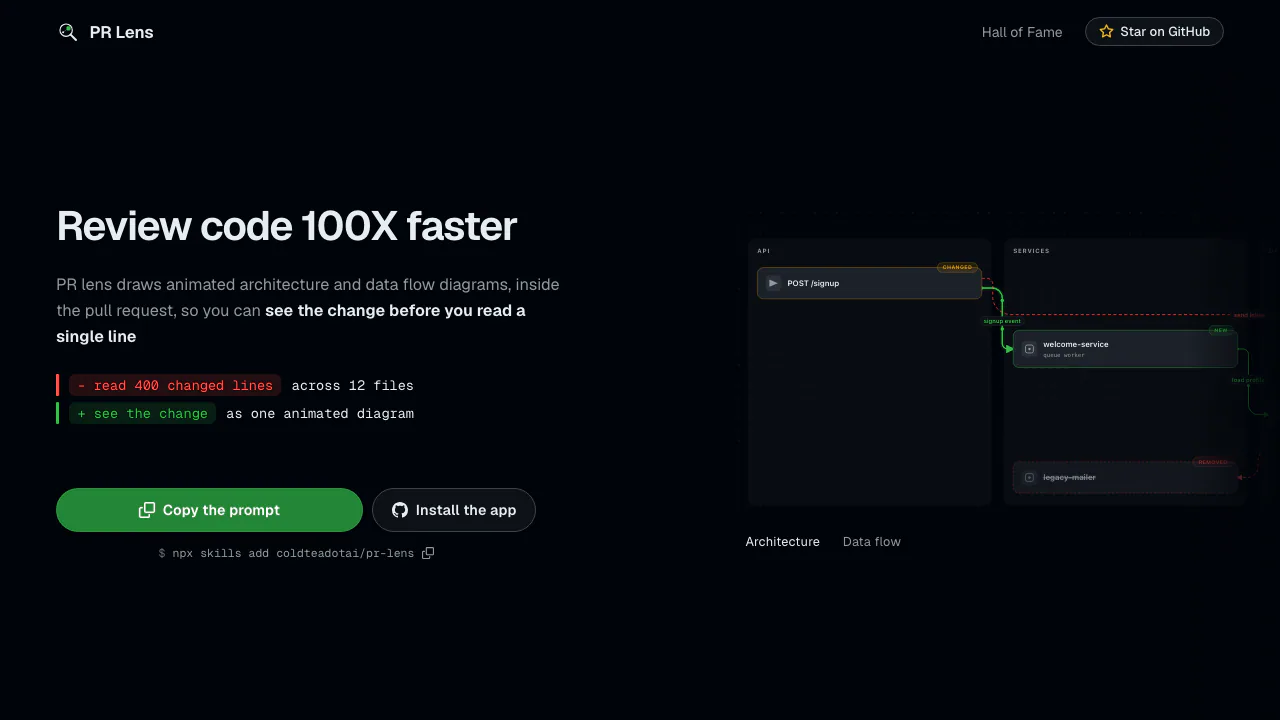
PR Lens is an open-source AI pull request visualization tool for developers and reviewers. It turns a code change into animated architecture and data-flow diagrams, then places them inside the pull request so the team can understand the shape of a change before reading every modified line.
What does PR Lens do, in plain English?
A large pull request can make you hold file names, services, calls, and removed paths in your head at once. PR Lens converts that diff and its surrounding code into a visual map. The architecture view shows which components were added, changed, removed, or left as context. The data-flow view shows an ordered request or processing path when the change contains one. It is best understood as a comprehension layer for code review, not an automated bug finder.
How the diagrams help with pull request review
The architecture lens groups components into meaningful lanes and keeps unchanged neighbors visible, helping a reviewer see the likely blast radius instead of only a list of touched files. The data-flow lens animates steps in order, which is useful for tracing a new endpoint, queue, worker, or integration. A full-size canvas adds pan, zoom, themes, and a guided walkthrough. Generated SVGs contain no JavaScript, and the same validated graph document renders deterministically.
Four ways to use PR Lens
The hosted GitHub App is the simplest route: select repositories and it maintains one comment per pull request, updating it after each push. A GitHub Action runs in your CI with your own model key and can use Gemini, OpenAI, or an OpenAI-compatible endpoint. The CLI supports local analyze, validate, render, comment, and export steps. The agent skill lets an already-open coding agent create the graph document without adding another model key. Choose one automated path per repository so the App and Action do not produce duplicate comments.
A practical review workflow
Install the App or add the Action, then open a ready-for-review pull request. Start with the architecture diagram to identify changed boundaries and removed components. Switch to data flow to follow the runtime sequence, then open the canvas for a large change. Use the visual model to decide which files and paths deserve close inspection, but still read the relevant diff, check CI, and test behavior. If a label or grouping is wrong, add durable corrections in .github/pr-lens.yml instead of editing generated SVGs.
Cost, privacy, and important limits
PR Lens is free for open-source projects and its repository is MIT licensed. With the Action or CLI, you pay your selected model provider for analysis; the official site does not publish a single verified hosted-App price for private repositories. The hosted App clones the PR head into a single-use sandbox, uses a Gemini model, stores graph documents and rendered assets in object storage, and deletes the sandbox when the run ends. Those stored objects have no application-set expiry, and anyone holding a rendered-image link may fetch it. Teams with stricter source or diagram policies should review the official data-handling explanation and consider the local CLI or agent skill.
Frequently asked questions
Does PR Lens find bugs or security issues?
No. Its schema has no findings or security field. It explains what a pull request changes; defect-detection tools and human review should run alongside it.
Does PR Lens need an API key?
The hosted App uses the provider key operated by PR Lens. The Action and CLI use your own provider key. The agent skill reuses the model in your existing coding agent.
Can PR Lens work with private repositories?
The hosted App can run on selected private repositories, but teams should evaluate its storage and link-access model. Local modes are available when code or diagrams must remain under tighter control.
What happens after another push?
The GitHub App updates its existing sticky comment instead of adding a new one, so the diagrams follow the latest pull request head.
Official resources
- Read the PR Lens overview for the product’s scope and four run modes.
- Review the installation and permission guide before enabling the GitHub App.
- Browse the MIT-licensed source and documentation for configuration, packages, and issues.
Related tools
AI Coding & Developer Tools →
AutonomyAIContact

PolylaneFreemium
Connect production context to investigations, code reviews and fix PRs.
Kilo CodeFreemium
An open-source coding agent for IDE, terminal and cloud workflows
RevolteFreemium
Agentic software delivery from engineering intent to reviewed code and production workflows.
MuleRunFreemium
AI agents, cloud workspaces, and repeatable workflows