

DessnFreemium
Design and review changes against the frontend your product already uses.
QualityLayer for AI Coding Agent Workflows
An approval and review workflow for the coding agents you already use.
What does QualityLayer do?
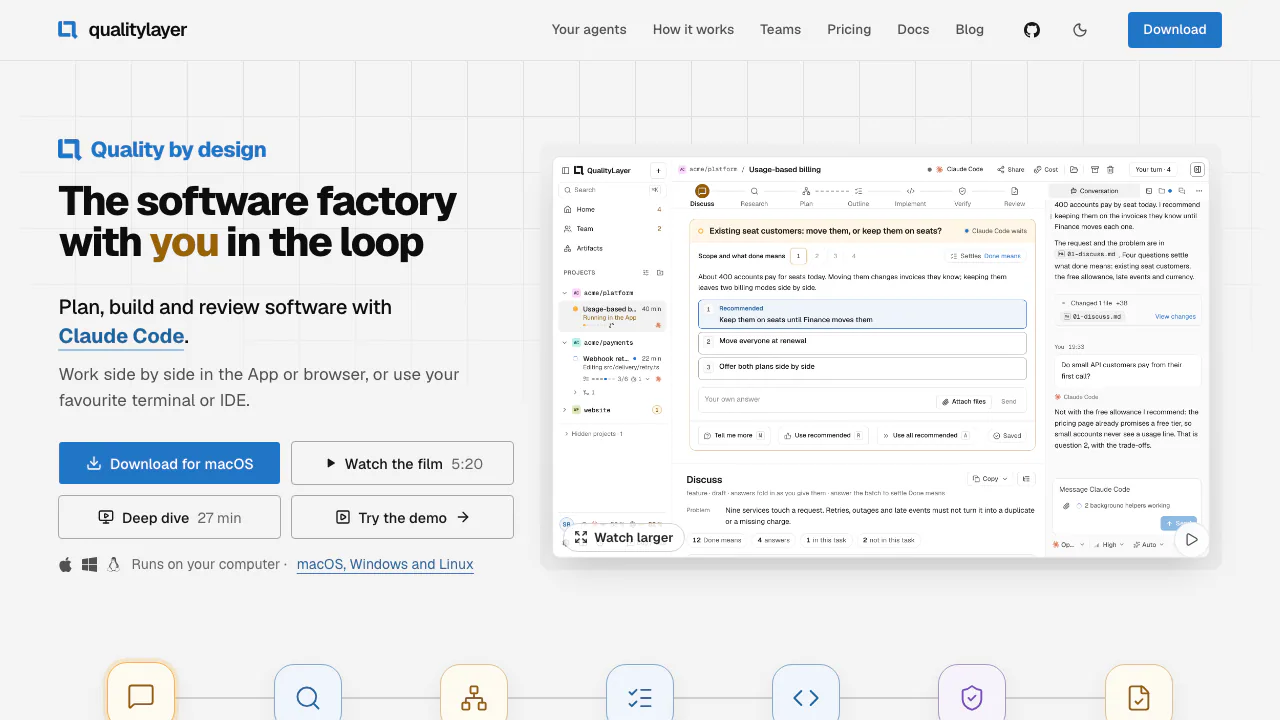
QualityLayer gives your coding agent a checklist for making a software change you can review. Say you want to add CSV export to an admin screen. You agree on who can export, which fields they can see and how you'll test it. Claude Code or Codex does the implementation. You get a plan to approve before editing starts and a review with test evidence before the change is shipped.
It's designed for developers and teams working in an existing repository, especially when a feature, bug fix or refactor crosses several parts of the code. For a quick explanation or a small edit, the app also has a direct Chat mode.
Plan the change before editing code
A structured task goes through Discuss, Research, Plan, Outline, Implement, Verify and Review. In the first two steps the agent asks what success looks like and reads the repository. The Plan captures decisions and how to prove each requirement. For a change to a screen, it may include a clickable mockup. A change map can show which files and dependencies the agent expects to touch.
Comment on the proposal or approve it to start the build. The agent then divides the approved work into testable slices. The repository retains Markdown task documents, so the reasoning can be read alongside the code.
Build and verify against the plan
The build starts with a failing test for a slice and records test runs with their commit and exit code. During Verify, project commands can cover tests, types, lint and builds. With independent review enabled, an agent that didn't write the patch checks the diff against the agreed outcomes and attaches evidence such as command output or screenshots.
In Review, inspect the diff, test results and any open items. A check that needed credentials or an unavailable environment stays unresolved. Final approval is separate from pushing the branch, creating a PR or merging it. How verification records evidence
Start a task in your repository
- Install the desktop app on macOS, Windows or Linux. Have Git, a repository and an installed coding agent you've already signed into and launched. WSL2, containers and servers can use the CLI and browser workspace.
- Choose + → Task → Feature or Bugfix, select the repo and agent, then describe a change and its expected outcome. You can also paste or attach an existing plan.
- Answer the agent's questions. Use Give feedback if a requirement is missing, or Approve and build here when the plan is ready. Choose a different build session if needed. Check the agent's permission mode during setup. First-task walkthrough
Trial, subscriptions and model costs
As checked on November 6, 2026, the trial lasts seven days and is available once per computer. Monthly billing lists Solo at €19 with unlimited tasks and repositories and Team at €29 per seat with plan sharing and team review. Annual billing and custom Enterprise terms are available. Prices are in EUR and tax depends on the billing country. Your agent subscription or API usage is billed separately. Current plans and billing terms
Where code and task data go
QualityLayer says it keeps code and task files on your machine by default. For team review, the branch goes through your Git remote. Shared content is encrypted before upload. If your coding agent uses a hosted model, its provider's settings and data policy apply separately. QualityLayer's data policy
Frequently asked questions
How does this fit with Claude Code's Plan Mode?
Plan Mode helps scope an edit. QualityLayer keeps an approved plan as a reference during implementation and adds a final review of the diff and recorded checks.
Can I use Claude Code and Codex on the same task?
Yes. Both are native integrations. You can choose an installed, signed-in agent for the build and use another for a second opinion. Shell-capable agents can also connect through the CLI.
Is QualityLayer free to try?
Yes, for seven days on each eligible computer. Your coding agent still needs its own account, subscription or API key.
Official resources
- Interactive sample workspace to see a task move from planning to review.
- Official GitHub repository for releases and issue reporting.
Related tools
AI Coding & Developer Tools →
HexmosFreemium
Review Git changes where they happen, from your terminal to your team's pull requests.
Agent ClanFreemium
Send tasks and review approvals across Claude Code and Codex sessions.
One RoofFree
Bring coding-agent sessions, approvals and bounded loops into one Mac app.
Navier AIPaid
An engineering agent for CAD, simulation, code and reports
WavefunctionFree
Parallel coding tasks with your own cloud or local models.