

myPipFreemium
Describe a game, test the result and improve it with AI.
Spacesheep: an AI workspace for documents your team can use
Turn AI output into shared documents, dashboards and small apps.
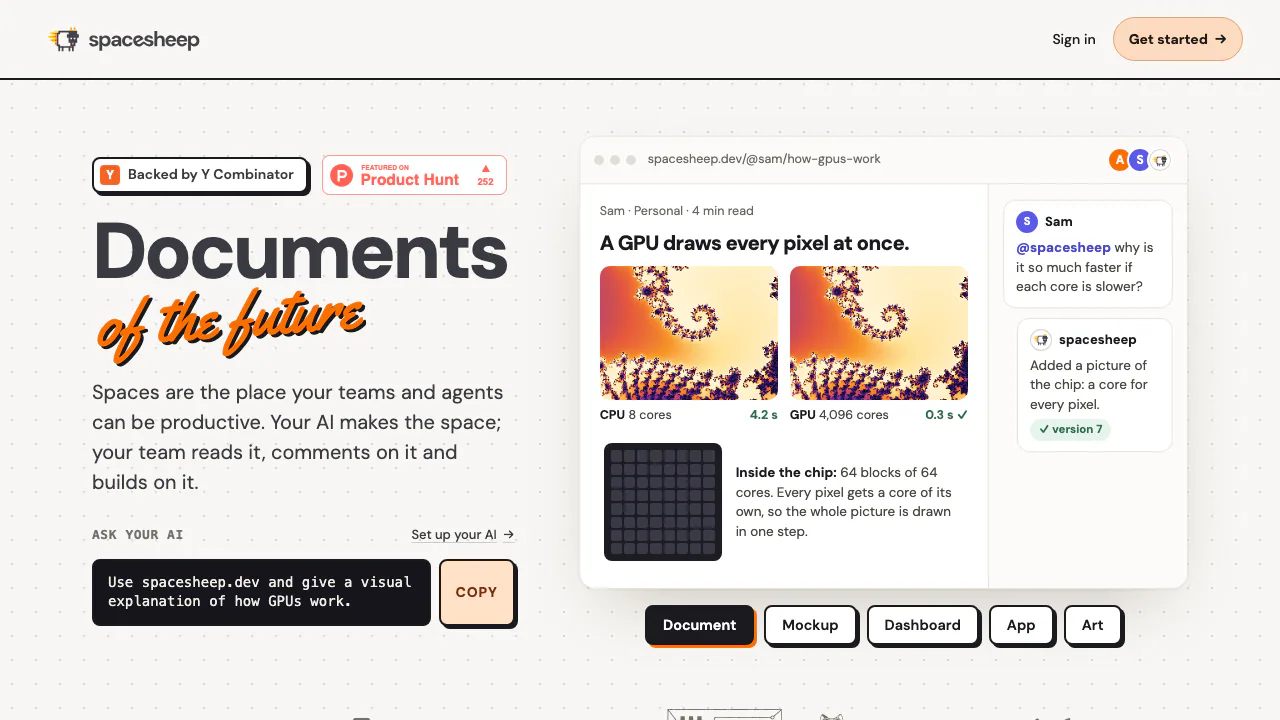
What does Spacesheep actually do?
Spacesheep is an AI workspace that turns an agent’s output into a web page people can read, discuss and keep improving. Each result is called a space: it can be a visual explanation, a research brief, a dashboard, a design mockup or a small interactive application. The result has its own link and version history, so your team can return to the work after the original chat has ended.
For example, a product team could publish a launch brief, comment on a particular chart and ask an AI to revise that same space. Connected tools such as Claude Code, Codex and Cursor can work through MCP; the site also offers its own agent. This suits teams handing AI work to colleagues or clients, and makers who need a usable browser prototype. A generated page still needs review for correct facts and working interactions.
From a prompt to a reviewed team page
- Create an account and choose the built-in agent or connect a compatible client using the official connection guide.
- Supply the source material, intended audience and desired outcome. Ask for a space with a clear summary and appropriate charts or controls.
- Open the returned link. Check the numbers, layout, sources and behavior before sharing.
- Select the intended audience in the sharing controls. A new space starts private; creating or deploying it does not automatically make it public.
- Invite reviewers, collect comments and request changes to the existing space. Open the resulting version and confirm that the feedback was addressed.
Comments can attach to a selected passage or an element, which gives reviewers a precise place to discuss a claim. Mentioning @spacesheep can bring its agent into the discussion. Other connected AIs can continue the same space at the same address, while version history lets you compare and restore changes.
When a document needs to do something
Spaces can contain forms, polls, task boards and other small apps backed by JSON records. They are useful when readers need to submit a response or update shared information alongside an explanation. Records require a signed-in reader who can access the space, even when the static page itself is open by link. Storage limits are 32 KB per record, 2,000 records per collection and 20 collections per space; check the record storage documentation before designing a larger workflow.
Website files such as HTML and CSS can also be deployed. For a handoff that needs a file, browser printing and PDF generation are documented options. An interactive web space and its printed PDF serve different purposes: test the live controls in the browser.
Free publishing and paid working limits
Checked on 29 October 2026: Free includes sharing controls, comments and versions, with 200 files and 25 MB per deployment. Its hosted-agent allowance is listed as 7 million tokens per 30 days, alongside shorter-window limits; it is not unlimited AI use.
The monthly USD list prices are $4.50 for Pro, $9 for Max and $10 per member for Team. Pro increases deployment capacity and adds daily Google Drive backups. Max adds features including voice operation and Streams; Team adds team sharing and connected tools. Checkout may use local currency and add applicable tax. Review the current plans and detailed limits against your file sizes, AI use and collaboration needs.
Data handling to understand before connecting an agent
Spacesheep says it does not use space content to train models or sell personal data. Relevant content can still go to your configured model provider, and Pinecone processes text for semantic search. Optional coding-session hooks upload supported conversation turns and session details. Check the privacy policy before enabling them or handling confidential work. Users retain their existing content rights and remain responsible for what they publish. Keep an independent copy of critical work; the terms do not promise uptime.
Frequently asked questions
Can I start without paying?
Yes. Free supports publishing and collaboration within its file, publishing and agent allowances. Daily Drive backups start on Pro.
Can a different AI update a space later?
Yes, when that AI is connected with the necessary authorization. It can read the current space and create the next version at the same link.
Does sharing a link make it public or searchable?
Access depends on the space’s sharing setting. Private links require permission. Public static pages can open without sign-in; search listing is a separate choice. Record-based interactions still require sign-in.
Does “no training” mean no external processing?
No. The platform’s no-training statement coexists with model-provider processing and semantic search services. Review the policy and the provider terms for your configuration.
Official resources and community
- Support and account help: connection, publishing and data questions.
- Official Discord community: feedback and discussion, linked from the support page.
Related tools
AI Workspace & Notes Tools →
Base44Freemium
Turn a plain-language idea into a working app with data, login and hosting.
HeyPiFreemium
An AI meeting workspace for turning live discussion into work.
AgentGrid.ioFreemium
Keep AI deliverables, team context and version history together in a shared workspace.
QuelloFree
Ask across your documents and tools, verify the sources, and write with workspace context.
AncherFreemium
Save your sources, find them by meaning, and turn them into useful work.