

sideOSPaid
Voice commands, local dictation and tasks in your Mac apps
Basedash — AI analytics platform for business teams
Ask business questions, check the SQL and build live dashboards from connected data.
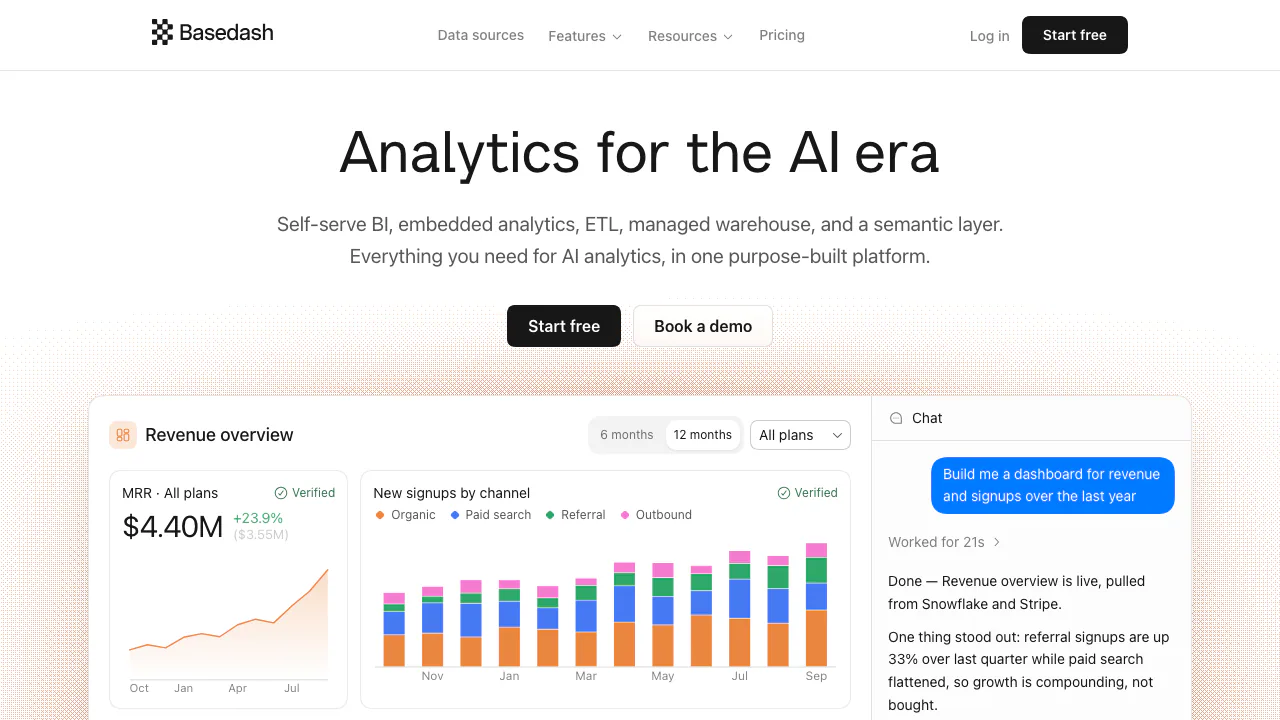
Basedash is an AI analytics platform for teams that want answers from company data without building every query and report by hand. It combines conversational analysis, dashboards and shared metric definitions, while keeping the SQL available for review.
What does Basedash do, in plain terms?
Think of Basedash as an analyst who can work with the databases and business systems your team connects. Ask how many customers converted last month, then request a breakdown by acquisition channel. It can run the analysis and turn the result into a table, chart or dashboard.
The useful distinction is that it calculates against connected data and exposes the query behind the answer. Product, growth, finance and operations teams can investigate routine questions themselves; data specialists can inspect the logic before anyone relies on the numbers.
Connect business data and agree on your metrics
An administrator can connect an existing database or warehouse, including Postgres, MySQL, SQL Server, Snowflake, BigQuery or Databricks. SaaS sources such as Stripe, HubSpot and Salesforce can instead sync into Basedash Warehouse. The vendor advertises more than 750 connectors; check the particular source and authorization requirements before planning a rollout.
Models add a shared semantic layer: reusable SQL datasets, measures, segments, relationships and a default time column. Define what “active customer” or “revenue” means once, so chat and dashboards reuse the same logic. Admin verification identifies approved models, and edits require a fresh review. Existing dbt warehouse tables and persisted descriptions can be used, but Basedash does not parse dbt project files.
From a question to a checked dashboard
- Register with a work email and verify it. Have an admin open Data → Add data source, supply the connection details and test the connection, or authorize a SaaS connector.
- In Chat, ask a bounded question with a metric and period. The official guide uses English prompts, such as “How many new customers did we get each week this quarter?”
- Ask a follow-up to change the segment, time interval or chart. Clarify business definitions instead of treating the first interpretation as final.
- Expand Analyzed for… and Sources, then open the chart to inspect SQL. Check filters, joins and totals against your source data.
- Use Add to dashboard, choose a dashboard or Drafts, and set sharing rights for the intended members or groups.
You can also describe an entire dashboard and refine its charts, filters and layout. Result data can be exported as CSV, JSON or Excel. The official quickstart documents the setup and sharing controls.
Keep track of changes without opening every report
Insights can produce a briefing with an explanation and chart, delivered to Slack or email on a daily, weekday, weekly or monthly schedule. This is useful for following conversion changes or revenue movements without repeatedly opening reports.
Use an automation when you need a precise rule, rather than an agent deciding what looks noteworthy. Define the condition and inspect its outputs before relying on alerts. Insights and other AI actions contribute to AI usage.
Use analytics in Slack, AI agents and your product
Slack lets colleagues ask in the conversation where a decision is happening. Through the MCP server, compatible clients such as Claude Code, Cursor and ChatGPT can ask questions or build dashboards using the same models and access rights. The first MCP connection uses OAuth. A REST API supports custom applications.
Enterprise embedding can place dashboards and AI chat inside your own product using React components or an iframe. This requires tenant and permission design, including server-signed tokens; it is an integration project rather than simply making an internal dashboard public. Standalone single-chart embedding is not currently supported.
Trial, team pricing and AI usage
Checked on 25 October 2026: Basedash offers a 14-day trial without a credit card, beginning when the first source is added. Ongoing BI use is paid. The public Startup plan lists US$1,000 per month plus AI usage for up to 25 users, with US$1,000 in monthly AI credits.
AI actions beyond included credits incur usage charges, visible in Billing. Enterprise pricing is custom and covers requirements such as embedding, self-hosting and advanced identity controls. These are public USD terms, not a local tax-inclusive quotation. Check the current plans and usage terms against your team size and expected workload.
Permissions, privacy and practical limits
Basedash states that customer data is never used to train AI models. Its controls include role-based and row-level access, encryption and cloud, private VPC or self-hosted deployment options. Availability depends on the plan and deployment. Review the security documentation and privacy policy before connecting sensitive business sources.
The analyst is read-only by default, and AI write queries require explicit approval. Useful results still depend on correct source data, suitable permissions and agreed metric definitions. Test a representative business question and verify its SQL before distributing a dashboard; the platform does not remove that review step.
Frequently asked questions
Is Basedash free?
A 14-day trial is available without a credit card. The ongoing platform uses paid team plans plus AI usage; a trial should not be treated as a permanent free plan.
Do I need to know SQL?
You can ask questions without writing SQL. Someone who understands the data should still check the generated query, especially joins, date ranges and metric definitions.
Can Basedash query databases and SaaS data?
Yes. Supported examples include Postgres, MySQL, SQL Server, Snowflake, BigQuery and Databricks, plus SaaS data synced into the managed warehouse. Confirm the exact connector you need.
Is company data used to train AI models?
Basedash explicitly says it does not train AI models on customer data. That statement does not replace checking access rights, data retention and your chosen deployment conditions.
Official resources and developer channels
- Documentation: setup, analysis, administration and API reference.
- GitHub organization: public developer resources; this does not imply the full BI service is open-source.
- Official X account: product announcements.
- Company and support information: evaluation, onboarding and customer support routes.
Related tools
AI Business Intelligence & Analytics →
Lexmount BrowserFreemium
Search, extract and automate webpages with managed cloud browsers
OpenStatusFreemium
Open-source monitoring, status pages and reviewed AI incident workflows
LookoutFree
Watch selected Slack channels and turn matching messages into useful actions.
ToriFreemium
Product answers from your docs, with your team ready to step in.
readywhenFree
Turn promises in emails, chats and call notes into reviewed follow-up.