

MachineMailFreemium
Real agent inboxes with MCP, API access and message trust reports.
Kwant: self-hosted AI agents for a team that gets work done
Run your own AI team with handoffs, schedules and approvals.
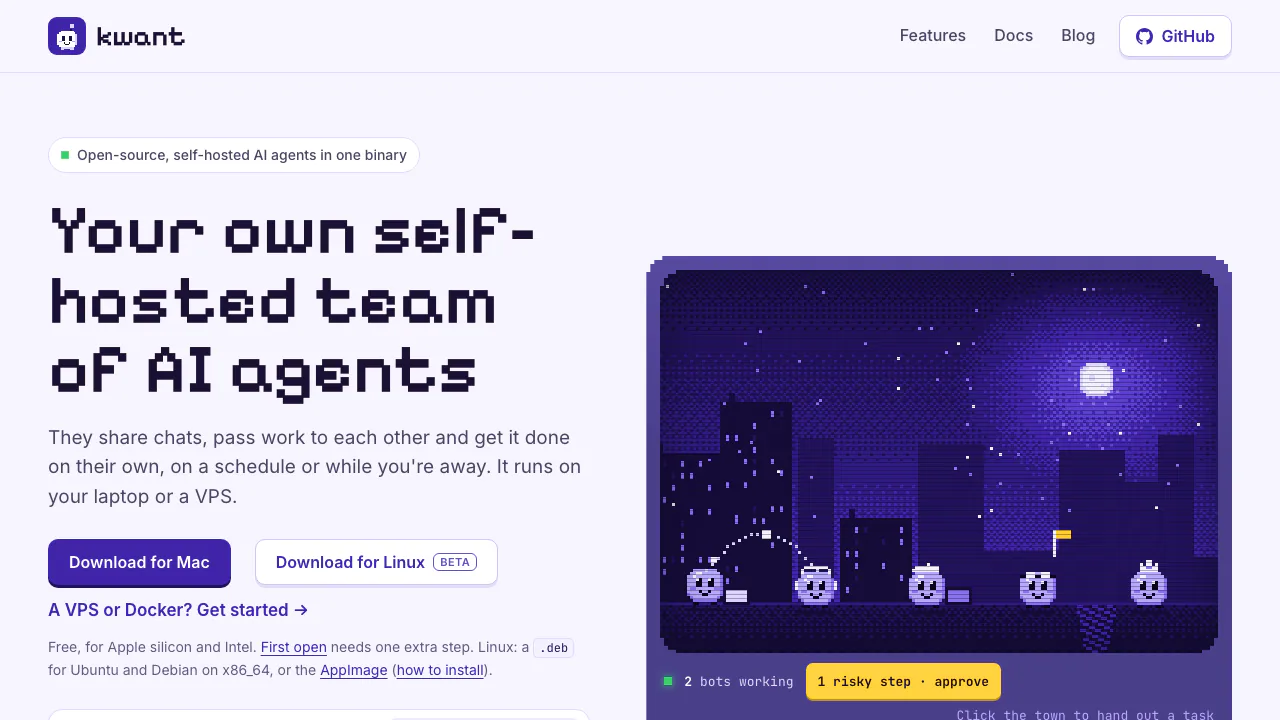
Kwant is a free, open-source application for running self-hosted AI agents on your own computer or server. Give bots different roles, let them pass work to each other, and schedule recurring tasks while keeping the application and its records on infrastructure you manage.
What does Kwant actually do?
Think of a small digital team in a shared workspace. One bot can investigate a question, another can review the result, and a team lead can return a summary. You communicate through chats rather than writing the coordination code yourself. Kwant supplies the workspace and execution tools; the AI comes from model accounts or endpoints you connect.
It suits people who want reusable assistants for research, software projects and recurring checks. You also take responsibility for keeping the host running, maintaining access and reviewing what the bots can do.
Delegate work and check the result
Each bot has its own role and model. Shared channels, direct chats and @mentions support handoffs; a team discussion can be collapsed under the lead's summary. Spaces keep work, personal projects and home activities organized with separate bots, accounts, routines and settings.
Kwant also distinguishes a bot's claim of completion from a task that has passed an executable check. Its browser can validate quoted text against a source page before returning a highlighted link. These mechanisms help inspect evidence; they do not guarantee that every answer or action is correct.
Connect models and useful tools
The account documentation covers Claude, Codex and Grok profiles, API keys and custom servers, including local model services such as Ollama. You can order accounts within a space. Eligible turns can move to another account when usage is exhausted or a login is unavailable, before anything has been shown or done. This does not remove provider quotas.
Through MCP connections, register a command or streamable HTTP endpoint, use Connect to test it, then assign its tools to particular bots. Custom OpenAI-chat endpoints can receive MCP tools; custom Anthropic-Messages endpoints currently run without tools.
Put a recurring task on a schedule
Ask a bot to create a routine or open Settings → This space → Routines. Select the bot, write the prompt, choose a destination and set a daily, weekly, monthly, interval or cron schedule. Run now lets you inspect the output before relying on repeated runs.
For example, start with a daily summary of a source the bot can already access. Check the first answer, its evidence and the run history. Inbox separates work waiting on you, completed handoffs and failed or stuck runs. Closing a browser tab does not stop the server, but the host and required model services must remain available.
Get a first instance working
The quickstart provides a reproducible source path:
- Install stable Rust and Node.js 20 or newer.
- Clone https://github.com/alexsergivan/kwant.git, enter the kwant folder and run make run.
- Open http://127.0.0.1:8799 and add an AI account under Settings → This space → Accounts.
- Ask in #general or address a bot with an @mention. Confirm that it answers before adding external tools.
The installation guide also offers a universal Mac app, an x86_64 Linux desktop beta and VPS/Docker deployment. The Mac app is not Apple-notarized. Building needs the toolchain; the finished binary does not require Node.js. Remote access has separate authentication and HTTPS requirements.
Control approvals and understand data flows
Approval modes range from asking on commands to asking on risky actions or allowing ordinary execution. Inspect the proposed command and arguments before allowing it. Smart approval is not a sandbox: local commands can use the host user's access, and provider CLIs still run on the host even when Kwant's browser uses VM mode.
When a website requires sign-in, a sign-in card lets you take over the browser and return it when finished. Avoid putting passwords into chat. The privacy policy says the software has no project telemetry and stores records locally, but connected cloud models receive messages, files the bots read and tool results. Initial routing-model downloads, desktop update checks and optional connectors also use the network.
Free software, separate operating costs
Checked on 5 November 2026: Kwant is free under AGPL-3.0. Model subscriptions, API calls, hosting and other connected services can still cost money. There is no verified bundled allowance of free model calls. Consult the license terms before offering a modified version over a network or seeking alternative commercial terms.
Common questions
Is Kwant free to use?
The software is free. Your model providers and infrastructure set their own charges and limits.
Does self-hosting mean it works completely offline?
No. The application runs on your host, while inference and tools follow the services you configure. A local model endpoint can reduce cloud dependence; each connection still needs checking.
Can it run tasks after I close the tab?
Yes, routines can run in the background while the Kwant process, host and required services remain running.
Official resources
- Source code and releases: inspect the project and downloads.
- Issue tracker: report reproducible problems.
- Approval guide: check action controls and their limits.
Related tools
AI Automation Tools →
Navier AIPaid
An engineering agent for CAD, simulation, code and reports
One RoofFree
Bring coding-agent sessions, approvals and bounded loops into one Mac app.
SynterFreemium
Connect your AI assistant to ad reporting, campaign drafts and governed execution.
Teamily AIFreemium
People and AI agents work together in one messenger
TestiflyPaid
Discover web-app flows, generate tests and investigate regressions with AI.