

AncherFreemium
Save your sources, find them by meaning, and turn them into useful work.
Ayven: AI project management through team coordination
An AI coordinator for following up with people, tracking tickets and keeping long-running team work moving.
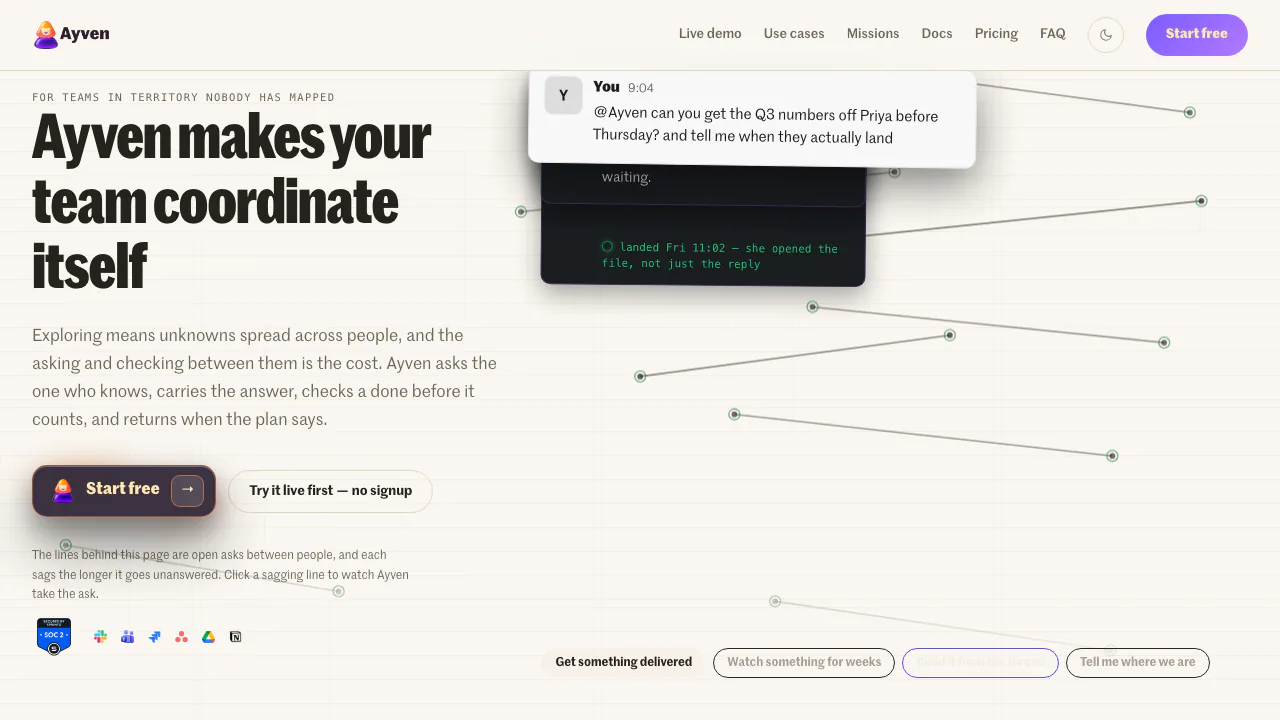
What does Ayven do, in plain English?
Ayven helps with AI project management by taking on the coordination work between people: finding who owes an answer, asking for it, checking progress and reporting back. Built by Alknoma Ltd, it works in Slack and Microsoft Teams alongside your team's existing tools.
For example, a launch may be waiting on a copy review, an engineering fix and a decision from a manager. Ayven can keep track of those requests and their owners instead of leaving someone to reconstruct the situation from scattered conversations. It is most useful when work repeatedly stalls between teams. The people doing the work still make decisions, approve changes and check the result.
Turn a Slack discussion into owned work
A practical first test is one conversation that should become a task. Choose something with a clear desired outcome and a date, such as investigating a reported checkout problem.
- Install the official Slack app and invite Ayven into the relevant channel. For Microsoft Teams, the documented route is to download the app package and upload it through Apps → Manage your apps → Upload an app.
- Mention
@Ayvenin the discussion and explain what should happen. Include the context, intended owner if known, and deadline so the request is concrete. - Start with Ayven's native web tickets, or connect Jira Cloud, YouTrack or Asana from the web app if your team already tracks work there.
- Review the proposed ticket. The documented process checks for similar existing issues and lets you inspect or change the title, description and priority before approving it.
- Check that the approved task appears in the right place. When a mission tracks a ticket, Ayven follows its state and counts it complete when the ticket reaches Done.
The ticket workflow guide explains the review steps. Ayven adds follow-up to an existing tracker; adopting it does not require moving your entire project history to a new board.
GitHub is also listed as an integration. Developers can reach the agent through its HTTP API or connect compatible AI tools over MCP with a user API key. Those are optional ways to send work to Ayven, with rate limits and access controls of their own.
Keep multi-week work moving
Missions hold concerns that last beyond one conversation, such as unresolved launch dependencies or questions from a platform review. They keep the next action, missing information and progress available over time.
A mission can pause when it needs an answer, direct a specific question to the relevant person and resume after the reply. It may close when its goal is met and reopen if conditions change. This makes it suitable for recurring follow-up, while still requiring a team to supply missing decisions and maintain accurate task states. A Done status is an observable completion signal, not a guarantee that the deliverable meets every requirement.
Research and write from the team's sources
Ayven can research connected documents, the open web or both. Internal mode restricts research to connected documents; external mode uses the web; hybrid combines them and is the documented default. Findings include web sources, confidence information and follow-up questions.
A useful request could ask for a comparison of available options using the team's existing notes. Review the cited material before relying on the conclusion. If the result needs to become a document, Ayven plans its sections, writes in the connected workspace and presents changes for approval. It also indexes the documents it creates so later searches can find them.
This workflow suits a team that wants research to become a reviewable plan or ticket. Exact import and export format coverage should be checked for the storage connection you intend to use.
Set access and review controls
Ticket and document changes normally wait for approval. However, messages and overdue-ticket status comments can go out automatically, and a team can configure certain operation types for automatic approval. Deletions still require a person. Choose those settings deliberately before treating a workflow as fully supervised.
The team intelligence documentation says its profiling analyzes invited public workspace channels and excludes private channels and direct messages from that analysis. This describes the profiling scope, rather than promising that no private interaction with the agent can occur. OAuth access can be revoked, and the vendor states that customer data is not used for model training.
Ayven says it works best in English, with research strongest on English-language sources. Multilingual teams should test their actual requests and terminology; the documentation does not establish equal quality for every language.
Free credits and paid execution capacity
The public plans were checked on October 13, 2026. The Free plan includes 500 credits per month, all integrations, one autonomous slot for background work and one interactive slot for direct requests. Each completed run consumes one credit on the free allowance or a purchased credit pack.
Standard removes the credit count but has one autonomous and three interactive slots. Premium provides three autonomous and five interactive slots. Team members are included without per-seat charges. Unlimited usage therefore does not mean unlimited simultaneous work.
Free credits reset monthly. Purchased credit packs do not expire, and work pauses when the available credits run out unless you top up, upgrade or wait for the reset. Paid subscriptions have monthly and annual billing options; an advertised annual monthly equivalent is not a month-to-month bill. Compare the current plans and credit packs against both your expected workload and your concurrency needs.
Questions teams ask
Can a whole team try Ayven for free?
Yes. The Free plan includes team use and 500 monthly credits without requiring a card. It is a practical way to test a small coordination workflow, but it has finite credits and execution slots.
Do we need Jira or Asana before using Ayven in Slack?
No. Ayven can track requests and create native web tickets before an external tracker is connected. Connecting a tracker lets approved work land in the system your team already uses.
Does Ayven use team messages to train models?
The vendor states that it does not train on customer data. Its documented team-profiling scope covers invited public channels. That statement does not establish a complete retention schedule or all contractual data-processing conditions; teams with specific requirements should verify them with the provider.
Official documentation and help
- Getting started and product documentation: installation, workflows and feature guidance.
- Integration and API entry points: supported tools and ways to connect them.
- Official support form: account, billing, integration and technical questions.
Related tools
AI Automation Tools →
SquadRoomPaid
Give specialist agents a task, then review the work, documents and report.
BackdropFreemium
Create AI coworkers that use your tools, carry team context and move work forward.
KodloPaid
Find suitable prospects, check the evidence and prepare outreach in one sales workspace.
MeleteContact
AI agents that turn connected work into reviewed plans and follow-ups.
IncrediblePaid
Delegate browser, app and file work by voice or text.