

EarnoteFreemium
Turn recordings into structured notes, tasks, flashcards and PDF study sheets on Apple devices.
SuperLocalMemory — local AI agent memory across sessions
Keep project facts, decisions and rules available to your connected AI assistants.
What does SuperLocalMemory do?
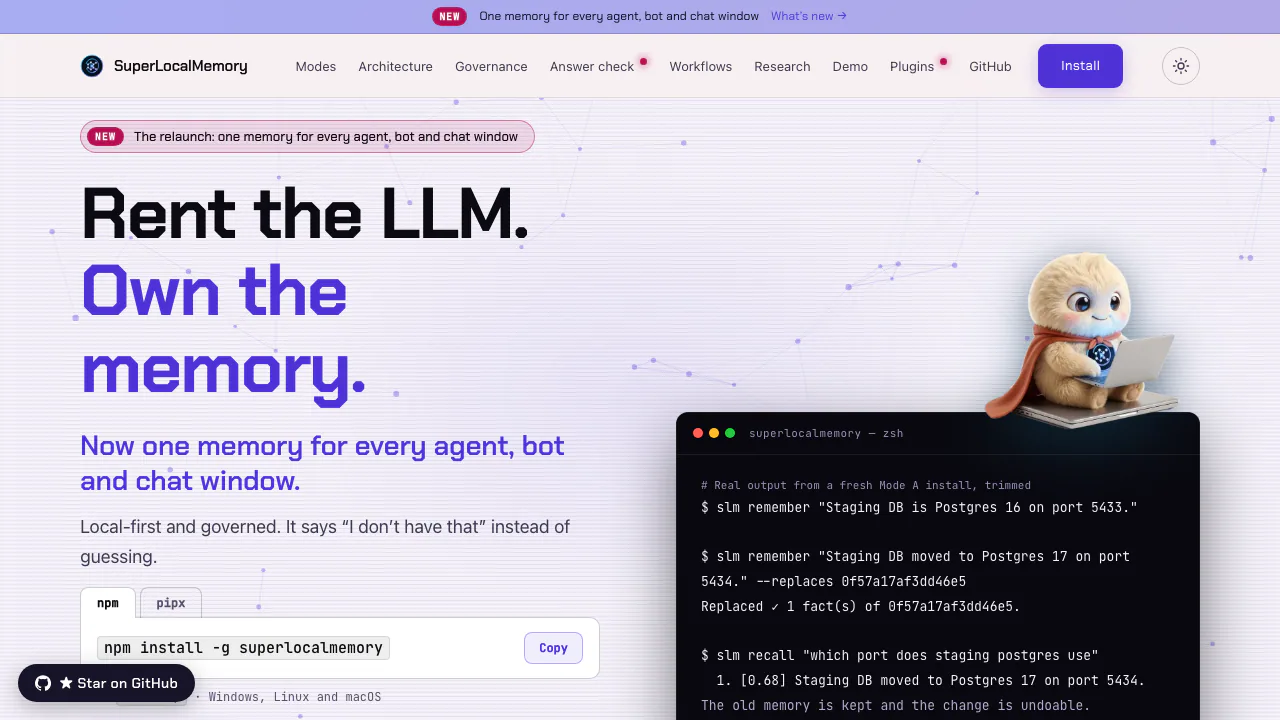
SuperLocalMemory is an open-source AI agent memory system from Qualixar. Think of it as a searchable project notebook that your connected assistants can read and update. A decision saved during one coding session can be retrieved in a later session, so you spend less time repeating the same background.
It provides the memory layer around an assistant: persistent storage, retrieval, corrections and access controls. It is particularly useful for developers who switch between editors, maintain long-running projects or want to control where project knowledge is stored. Using it still requires installation and a client that invokes its memory tools.
Keep decisions useful after a session ends
You can save facts, decisions, rules and procedures rather than relying on an entire chat transcript. Recall combines meaning, keywords, time and relationships to find relevant records. Project and memory-kind filters help distinguish a deployment decision from a similarly worded note in another project.
When something changes, replacement preserves the earlier record while making the updated fact current. Reviewed corrections and rollback help recover from a bad edit; time-based retrieval can distinguish when an event happened from when the system learned about it. These are useful controls for a knowledge store that needs to evolve, although a high retrieval score is not proof that a statement is true.
Try your first memory and connect an editor
The installation guide documents an npm route requiring Node.js 18+ and npm 9+, or isolated Python installation with pipx/uv and Python 3.12–3.14.
- Install with
npm install -g superlocalmemory. - Run
slm setupand choose Mode A for the local core path. - Save a harmless project fact, for example
slm remember "The staging database uses port 5434.". - Retrieve it with
slm recall "Which port does staging use?"and check that the actual record answers your question. - Inspect
slm status, then connect a supported editor, for exampleslm connect cursor.
This small test checks storage and retrieval before you depend on automated capture. Other hosts have their own instructions: packaged plugins, hooks and MCP configuration are not identical for every editor. Supported prebuilt installations cover Apple Silicon macOS, 64-bit Windows and 64-bit Linux; Intel Macs and 32-bit Windows do not have a prebuilt installation.
Choose where your memory is processed
Mode A uses local embeddings and does not require a generative-model provider for core save and recall. Initial dependencies and model downloads still require preparation. Mode B adds a language model through Ollama or another compatible endpoint; processing stays on your machine only when that endpoint actually runs there. Mode C can send questions and memory text to the configured provider.
The mode comparison separates these paths. Optional online checks, connected assistants, integrations and backups need their own review. A locally stored database does not make a cloud assistant's processing local. Workspace roles, scopes, retention and audit controls help manage access, but they are engineering features rather than a compliance certification.
Check whether a retrieved fact answers the question
Similarity and evidence are different. The answer checker evaluates whether the retrieved records support the requested answer. Laya performs this check on Apple Silicon, with an approximately 1.1 GB model download and no per-use provider charge. Jev is an optional online alternative requiring your own provider key and consent.
Jev normally sends the question and the top three memories; enabling its separate reordering option can send up to twenty. The answer-check guide explains the boundaries. An insufficient-evidence verdict helps an agent avoid treating a near match as an answer; it does not guarantee that the assistant will never make a mistake.
Bring documents and web assistants into the same workflow
Optional local media indexing makes supported images and PDF pages searchable, using OCR and file/page references. It is disabled initially and requires 16 GB of memory plus model downloads. Folders and Obsidian vaults can also be mirrored read-only with slm sources add; this is useful when source documents should remain under your existing file management. Media indexing is not supported on Intel Macs or Windows on ARM.
For supported web assistants, enable Web access, select the profile and add a connected app. OAuth and per-app read-only or read-and-save permissions control access. Your computer must remain online. The database remains on it, while tool requests and results pass through the gateway and the connected application.
Costs, licensing and practical limits
Checked on 18 October 2026: the local core is free under AGPL v3. Optional Web access includes a daily allowance per connection, but the inspected pages do not establish a universal numerical limit or paid tariff. Cloud models, Jev provider usage and your existing AI client can have separate charges. Review the repository's license for your deployment instead of assuming unrestricted redistribution.
Frequently asked questions
Can SuperLocalMemory work offline?
The Mode A core can run locally once dependencies and models are present. Online providers and Web access need connectivity, and the assistant you connect may have its own network requirements.
Do I need an API key or subscription?
Neither is required for the local Mode A core. Jev and configured cloud providers use your own credentials and may bill usage separately; the free core does not include those services.
Can different AI assistants reuse the same memory?
Yes, supported clients can access the same store through their integrations or MCP. Configure the intended profile and permissions, then test saving in one client and retrieving in another before using it for important project context.
Official resources
- Official source repository and documentation: inspect the license, integrations and implementation guides.
- Daily workflow examples: saving, replacing, recalling and connecting web applications.
- Governance and data controls: workspace access, retention, audit and deletion boundaries.
Related tools
AI Databases & Context Infrastructure →
NitroStackFreemium
Build typed MCP tools, inspect their behavior and deploy them with a connected development stack.
ParrotFree
Record, transcribe and review meetings on your Mac, with live help from your own documents.
CopilotKitFreemium
Connect your application's interface to AI agents, tools and human decisions with an open-source SDK.
guilds.runFree
Run agent teams and inspect their prompts, tools and memory.
BevelContact
Enterprise AI agents built in your infrastructure, with Hexis for shared context and tools.